Categories
Cuba iPhone 5 Nikon Photography Photography - Canon PowerShot S100 Photography - Nikon D600 Travel

What I Learned about Photography in Havana

Happy New Year - Havana - 2013

On my recent people-to-people cultural exchange visit to Cuba, I shot almost 1,500 images during six days of out and about walking – almost all of it in Old and Central Havana.

In packing for this trip, I wanted to stay light – but I also didn’t want to miss any photo opportunities due to not having the “best” gear. I had three cameras with me: a Nikon D600 (over my shoulder), a Canon PowerShot S100 (in a case on my belt), and my iPhone 5 (in a pants pocket). Most of my images were taken with the Nikon, a few with the S100 – and a number of “location establishing” shots with my iPhone – taking advantage of it’s ability to capture GPS location data. For the Nikon, I had packed three lenses – the “kit” lens that came with the D600 – a 24-85mm f/3.5-4.5 zoom, an 85mm f/1.8 prime lens, and a light 70-300mm f/4.5-5.6 zoom.

I decided not to take a tripod – I’m a pretty fickle tripod shooter anyway and figured opportunities for using a tripod in the heart of Havana might be limited.

On the first day, I carried two lenses along – one on the camera with the second in a pocket in my vest. I had brought along a small daypack but decided not to use it. Wish I hadn’t brought it – it stayed in my hotel room the whole time!

Each day, we were accompanied by a Cuban photographer – and I soon noticed how little gear they typically carried. The Cubans weren’t changing lenses – they were just shooting away with the lens on their camera. Nor were they carrying tripods.

After carrying two lenses and finding that I also rarely changed lenses, I mostly just went out with one lens on the Nikon – typically the 24-85mm zoom. That lens turned out to be near perfect for the street photography we were doing. The one time I made use of the 85mm prime lens was for shooting the show at the Tropicana. It was the ideal lens for that – having just enough reach and low light performance for that venue. I rarely used the 70-300mm zoom – should have also left it at home as it turned out but it’s a light enough lens to almost not matter.

For capturing street shots, I mostly left the Nikon in P mode – with auto ISO and auto focus enabled. The D600 does a great job at figuring things out – and I was mostly very happy with the images I got. A few times, focus was off – and I flipped it into a different focus mode to adjust. I also used aperture priority for a few shots where I really wanted more control over depth of field. But mostly I let the camera do its thing – and came away very happy with the results.

While the gear obviously matters, it turned out not worrying much about it was the best choice for me. Being in the moment, seeing such great opportunities in a venue like Havana, made capturing images such a delight!

I brought along an 11-inch MacBook Air – to use for offloading images from the SD cards each evening – as well as an external hard disk to backup the images from the Air – ending up with two copies of each original image. After offloading the SD cards, I would put them back in the camera and reformat them in the camera before going out each morning.

I enjoyed sitting in bed at night or early in the morning processing a few of my images on the Air using Lightroom and Photoshop CS6. We needed to select five of our favorite images for a group show the night before leaving Cuba – and that was easy given having the Air and Lightroom along.

Categories
iPhone 5 Photography San Francisco/California

In the Landing Zone at McCovey Point – San Francisco

Landing Zone - McCovey Point - China Basin Park - San Francisco

On a recent visit to San Francisco, I got to the City a bit early and headed over to McCovey Point right off Third Street across from the Giants’ AT&T Park.

There are these baseball shaped cement markers that ring the curb around the bend in the street that caught my eye, iPhone in hand. The bright spot was added using Trey Ratcliff’s Light Camera app – creating a surreal effect just for fun!

Categories
Apple iPhone 5 Menlo Park Nik Software Photography

The Best Camera – Cafe Borrone in Menlo Park

Untitled

This best camera is the one you have with you – as they say – and my iPhone is that camera for me. Here’s an image taken and completely processed on my iPhone 5. The courtyard area outside Cafe Borrone in Menlo Park is normally a busy spot – except when it’s wet and cold during the winter months as it was on this particular morning.

This image was shot as I was heading into breakfast one December morning – and then processed on the iPhone using Nik’s Snapseed and Painteresque. It’s really pretty impressive the kind of photography and post-processing that can now be done one these little sensor-loaded computers that we carry in our pockets.

I’ve got a domain that I haven’t had time to develop – theworldinmypocket.com over on Tumblr – where I want to develop this theme a bit further!

Categories
iPhone 5 Nik Software Photography

Looking Down the Beach at Point Reyes Drake’s Beach

Drake's Beach at Point Reyes  iPhone 5, Snapseed

Here’s a photo from Drake’s Beach taken on Sunday with my iPhone 5. I loved the combination of the little girl, her mother, and the kite in the sky up against one of those puffy clouds! A beautiful landscape indeed!

Cropped (16:9) and edited lightly using Nik’s Snapseed on my iPhone 5.

Categories
Black and White iPhone 5 Monochrome Photography Nik Software Photography Photography - Black & White

Looking Down Radio Road at Point Reyes

Radio Road - Point Reyes - 2013

On Sunday, Doug Kaye and I headed out to Point Reyes and a group photo walk at Drake’s Beach. Along the way, Doug stopped briefly at this road – which I call “Radio Road” – heading down to the old RCA / Marconi Radio site. I took this shot with my iPhone 5 looking out the car window – and processed it using Nik’s Silver Efex Pro 2, Topaz Simplify 4 and Photoshop CS6. It’s a moody, dark lane with this treatment!

For more about radio at Point Reyes, see: Communications at Point Reyes – the home of KPH. The article notes: “The Monterey cypress “tree tunnel” at the Point Reyes station is a signature landscape feature that evokes some of the prestige that RCA placed in this profitable, historic operation.”

Indeed! By the way, here’s what that Monterey cypress tree tunnel looks like from above.

Categories
iPhone 5 Photography

Happy New Year 2013!

Coastal Light - Pigeon Point - 2012

Happy New Year! Best wishes for a great 2013!

Categories
Black and White iPhone 5 Living Monochrome Photography Nik Software Photography Photography - Black & White Photography - Nikon D600 Santa Cruz

My Holiday 2012 Interlude – Over to the Coast!

This morning I had one of my regular holiday reactions – a sort of cabin fever – and headed out of the house to points unknown for a photography adventure. I packed my cameras in the trunk of the car, grabbed a couple of bottles of water, plugged my iPhone into the car stereo and headed up towards 280.

I thought I’d probably head for San Francisco. For the last few years, I’ve had this thing about shooting the Golden Gate Bridge at this time of year – especially if we’ve got clouds in the sky or a breaking storm moving east. We had both today. But my usual Golden Gate day was January 1st. I was a bit early for that.

As it turned out, as I was heading to 280, I was pulled west – over to the coast. I crossed 280 and headed through Woodside to Hwy 84 and up the hill to Skyline. I continued on down through La Honda, San Gregorio and over to Hwy 1. It was a beautiful drive – cloudy light overhead, a podcast on the radio, and nobody else around.

At Hwy 1, I turned left – heading south along the coast. I made a quick stop at Pomponio State Beach – and chatted a bit with another Nikon shooter about how great it was to just be out above the beach enjoying the late December light. The low sun angle this time of year makes it very special – my favorite time of year for great light. I loved the patterns the waves were making – such as the “S curves” below.

Pomponio State Beach

After Pomponio, I continued south on Hwy 1 – passing up the other state beaches along the way as I headed to Santa Cruz. My rough plan was to make a big loop over to Hwy 1, south to Santa Cruz, then up on Hwy 17/85/280 to get back home.

But, of course, there’s Pigeon Point on the way – one of the most beautiful lighthouses on the Pacific coast. I pulled off and had a great time walking along the cliff above the ocean leading south to the lighthouse itself. Here’s a shot taken with my iPhone 5 and post-processed using Nik’s Silver Efex Pro 2.

On the Edge - Pigeon Point - 2012

The clouds in the sky and the angle of the light today made for some very special shots – and, on purpose, I was traveling light. No tripod, no serious HDR kind of shooting, just handheld with my Nikon D600 and, when the mood caught me, with my iPhone 5 – such as the shot above. The light and clouds at Pigeon Point were beautiful and I made a number of handheld shots just walking around.

After a great time at Pigeon Point, I headed south – made a detour to try to find the old Bonny Doon Winery tasting room (it’s now in Santa Cruz!) before arriving at Santa Cruz’s Lighthouse Point Park. There’s a surfing museum there in a building that looks like a small lighthouse – but I was captured by the light and skies off the coast.

Rock of Ages - Santa Cruz - 2012

My loop took over to the coast and back took about four hours. It was great therapy for my cabin fever! Special light, lovely clouds in the skies, beautiful venues – it doesn’t get much better than this. I should be so lucky!

Categories
iPhone 4S iPhone 5 Nik Software Photography Photography - Canon 5D Mark II Photography - Canon PowerShot S100 Photography - Nikon D600 Photomatix Pro Photoshop

Lessons from 2012: What I Learned about Photography

Opera House - Sydney - 2012

Last year on New Year’s Eve I posted my thoughts on what I’d learned about photography in 2011.

Looking back on it, I think 2011 was perhaps the steepest slope in my photography learning curve – it was a remarkable year.

This year, my photography has continued to progress – but perhaps not quite as dramatically as that year of 2011. Looking back on it, I think I’ll remember 2011 as “my year” – when I seriously began moving beyond “snapshots” into serious photography. Here are my highlights of 2012 for my photography.

Capture

Last year I mentioned paying more attention to getting the image right in capture. What’s proven to be most important about that is slowing down – and “working the subject” in the moment. For me, it’s a struggle between my right/left brains. I need to force myself to flip between the more critical, analytical left brain and to get into the more creative right brain. I’m finding this easier to do – the more I shoot in the field, the more aware I’ve become of the flip.

I still worry a lot about getting the right capture – applying all of my left brain analytical skills to that task – but try to flip modes over to my right brain where I worry less about those details and just be creative. In my experience, I’ve begun to de-emphasize the gear and technique and emphasize the “in the moment” aspects – which are almost always surprising – and which I find delightful. Those shots add a lot to my enjoyment of photography.

Photowalks

Once again in 2012, Doug Kaye and I did several 1:1 photo walks around the Bay Area in 2012. These are always special – we pick a venue but let the experience take us where ever it does – at least once a month.

There’s nothing better that doing this kind of shooting – it’s great fun with a great friend and always a delight. As I mentioned last year, these photo walks are a “learning accelerator” for me.

One of my personal favorite photo walks was one we did early in 2012 at Pigeon Point Lighthouse. The light was very special that day – and one of my images ended up being the cover shot for my Portfolio 2012 photo book.

Photo Workshops

I benefited greatly from several photo workshops this year.

Perhaps the most valuable was the Eastern Sierra Fall Colors workshop that Doug and I attended led by Michael Frye. I’d never been to the other side of the Sierras – and seeing the colors in the fall in the company of Michael was amazing. A wonderful experience. I’m a big fan of Michael’s – having taken a private one-day workshop from him in Yosemite with my son David back in the fall of 2010. He’s a great teacher!

Earlier Doug and I enjoyed the Sonoma Coast Workshop led by Derrick Story. We’ve both taken several weekend workshops from Derrick – and learned a lot from each one. This time we headed up to Fort Ross – and had a great time shooting in wonderful light – plus doing a model shoot on the beach at Bodega Bay.

Post-Processing

If I were to label my 2012 photography learning, it’d be labeled Post-Processing. I’ve learned so much this year about how to take an image and make it into something I really enjoy. Lots of new tools have been part of that process for me – including the suite of Nik’s tools, Photoshop, Lightroom, etc. I’ve come to respect the Topaz tools for their ability to simplify and amplify images. And a huge set of learning came from the Lab color techniques of Dan Margulis and, simplified, Lee Varis. A workshop with local expert Mark Lindsay also had a big impact on my awareness of these techniques. 2012 was a great year for my post-processing skills – and I look forward to learning and applying them in 2013.

Portfolio

In 2011, I began creating my portfolio – for the first time. This year, I continued to add to it – such that there are now several hundred images in that portfolio.

This year, I wanted to focus on pairing that huge collection down to what I might consider “my best” – but I failed to do so. A goal of mine in 2013 is to try to do that – to distill my work down to 40 or so images that I consider my best work – out of the 400+ currently in my portfolio culled from the ~30,000 images in my Lightroom library. I’m always amazed at how the great photographers in history are judged on the basis of such a small set of their life’s work in photography. We went to see a Walker Evans exhibition at Stanford’s Cantor Art Museum this year – about 70 photographs represented his lifetime of work in Photography.

In November, I began working on a photo book with my most interesting work from 2012. I used iPhoto again this year to build the book – and the results came out looking great. I gave several copies to family members as Christmas gifts. Here are the photos I used for the 2012 photo book.

Online, I continue to enjoy Google+ where the community of photographers is very strong and engaged. After each of our photo walks, Doug and I typically share a few of our favorite shots on Google+. Flickr continues to be another valuable resource – and the iPhone app update that Flickr made late in the year brought a lot of fun back to using Flickr on the go.

Printing

I’ve been living a digital life with my photography – meaning that I’ve only been sharing bits of images online and doing very little printing of my images. What printing I’ve done this year has been using either Apple’s iPhoto books service or, for individual prints, Costco’s in-store printing.

I realize this is the next and, perhaps, final step for my work – completing the capture to print workflow. I’m looking forward to adding printing to my photography skills in 2013!

Summary

2012 was a different year for my photography – a more serious year and one more focused on both the details of capture but, perhaps more importantly, on the world of post-processing.

I’m looking forward to the new photography experiences and learning coming up in 2013 – including some radically new venues like Havana and Death Valley. Should be fun and rewarding!

My 2012 Photography Resources

See my Cool Tools page for my current list of recommendations. One major change this year was the purchase of a Nikon D600 2 – my first new DSLR in several years.

Categories
iPad iPhone 5 Journaling Living Mac

Congrats to Day One – 2012 Mac App of the Year

Back in September, I wrote about how an app had worked its way into my daily life. That app is Day One – a personal journaling app that works on my Mac, iPhone and iPad – and syncs across all three using iCloud (in my case) or Dropbox. Day One was just declared by Apple to be the 2012 Mac App of the Year – a very well deserved award in my view!

Congratulations to the small Day One team for creating such a great application that I use every day to capture those more personal moments, observations, and insights. I’ve got almost 350 entries in my Day One journal – since I started using it in early June following surgery. Day One’s cross-device sync’ing just works – and makes journaling anywhere so quick and easy. And the results are beautiful.

Highly recommended!

Categories
iPhone 5 Lab Color Photography Stanford

Walking Stanford

Stanford Memorial Church

Lily and I took advantage of a beautiful Saturday morning to head out for a walk at Stanford. We parked near the old Chemistry Building and then made a gentle loop of the Quad.

The photo above was shot with my iPhone 5 and then tweaked using one of my latest Lab color workflows in Photoshop CS6.

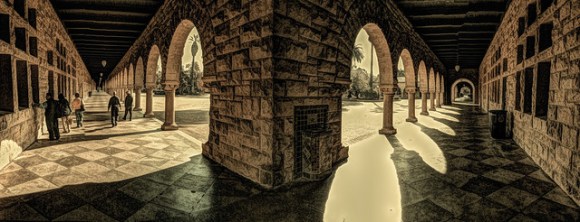
The photo below was shot on my iPhone 5 in Panorama mode and then tweaked in the iPhone using Painteresque and Snapseed.

Stanford Quad Panorama

It was a wonderful fall day for a walk on the campus! And I continue to really enjoy my minimalist photography – with just the iPhone 5 camera in my pocket!