Categories
Fujifilm X100T Lightroom CC Photoshop CC San Francisco/California Street Photography

More Multiples in San Francisco Street Photography

Clay Street Shooter - San Francisco - 2015

Last week I did a post about multiples in San Francisco street photography. It’s a fun – and, frankly, a pretty lazy technique. Why do I say lazy? Because you simply plant yourself at an interesting location (a carefully chosen interesting location!) and shoot away. The goal is to capture a series of images of the same area over a period of several seconds. Depending on your gear, you can fire away in single shot mode – or you can set your camera on burst mode – and just hold down the shutter button.

On my Fujifilm X100T, I typically set the Drive setting to Low burst and it works great. But you can just do this with your iPhone – simply hold down the shutter button and the iPhone will fire off a burst of images. The iPhone 6 fires at about 10 frames per second – so you’ll get quite a few images in just a few seconds of holding down the shutter button.

Doug recommends putting your camera in manual for these kinds of shots – so that the camera isn’t choosing different settings in between the shots. He’s more of a perfectionist in this regard than I am. I mostly just don’t worry about it.

The fun comes after importing the images into Lightroom and then editing them as layers in Photoshop. Photoshop’s auto-align will correct for any hand-held movement between the images. You’ll end up with a layer stack of images – all aligned. Now you need to look through the layers and decide how to blend them – to bring in details from various images/layers. That’s the fun part – and it can take a while to get it right.

The image above was shot by me standing behind Doug Kaye as he was using this technique on Clay Street in San Francisco’s Chinatown.

The image below is one that I constructed using these techniques while just standing along Stockton Street and capturing individual shots as people moved through my frame. One of the characteristics of these images that you’ll notice in this one is that people look just too close together. That’s because they weren’t – actually!

Busy Morning - San Francisco - 2015

Categories
Black and White Lightroom Lightroom CC Monochrome Photography Paris Photography Photography - Black & White Photography - Canon PowerShot S100 Photoshop CC Quotations Street Photography

Revisiting Paris in the Fall

Paris in the Fall

Last fall, I attended a wonderful street photography workshop in Paris led by Valérie Jardin. On one of our morning walks, there had been a bit of rain overnight which provided a lovely sheen to the streets. By mid-day, it was gone and the day turned sunny and bright. Turned out to be one of the gifts – a morning after the rain with the payment still wet and the skies beginning to clear.

Last night I revisited this image to post-process it again. I’ve recently subscribed to Lynda.com and yesterday watched one of the courses about Photoshop taught by Adobe’s Bryan O’Neil Hughes in which he revisited many old techniques and brought to light new and better ways to do things. As I watched his lessons, I was using this image as my test case. One of the points he stresses is using a non-destructive workflow in Photoshop – something I’ve not been doing but will certainly make much more use of in the future. With this image, I’ve got all of the layers saved in the TIFF file which is now in Lightroom. At some point in the future, I’ll come back to it – and continue a bit more post-processing doing some dodging and burning through luminosity masks.

I’m having fun revisiting Paris as I post-process this particular image. It was a quick “grab shot” at the time I took it – as I had fallen behind our group and was trying to catch up. Sometimes it’s better to be lucky – this was one of those times!

Categories
Black and White Photography Photography - Black & White Photoshop Photoshop CC

Moments at Drakes Beach – Experimenting in Black and White

Moment - Drakes Beach - 2013

I been doing a bit of experimenting over the last few days with black and white conversion techniques. I particularly find the work of Joel Tjintjelaar of interest – see his Joel Tjintjelaar Flickr Stream and his BWvision web site.

Joel’s latest work is based on a combination of masking techniques – traditional “hard selections” combined with luminosity masking techniques pioneered by Tony Kuyper. I’m intrigued with the notion of applying these techniques to street photography and will be experimenting more to see if we can create even more vibrant black and white street photographs using modifications of Joel’s and Tony’s techniques applied to street photography.

Here are a couple of additional examples from my experiments over the last few days:

Luke - Drakes Beach - 2013

David W. Packard Electrical Engineering Building - Stanford - 2011

Categories
Black and White Fujifilm X-E2 Monochrome Photography Photography Photography - Black & White Photography - Fujifilm X-E2 Photoshop CC San Francisco/California

Playing with Sepia Toning of Highlights in Monochrome Images

Moody #2 - San Francisco - 2014

I recently got reacquainted with the beautiful monochrome work of Michael Kenna. His images have a number of striking qualities – mostly long exposure, his use of grain, and the square (and small 8×8 inch) print size. But for me it’s the light in his images that grab me.

Doing a bit of reading of interviews of Kenna, he has spoken about his he uses a light sepia toning in the highlights of his images – and how, by doing so, the mind’s eye sees the highlights as a bit forward in space while the shadows are pushed back – adding a sense of dimensionality to an image.

This is an image of the San Francisco-Oakland Bay Bridge shot from San Francisco’s Embarcadero with my Fujifilm X-E2 on a particularly moody February morning. I used it as an example for applying this kind of technique – sepia toning of the highlights. To do so, it’s an easy process in Photoshop CC. Select the RGB channel to create a selection, then add a gradient map adjustment layer – the selection will automatically be loaded into the adjustment layer’s layer mask. Then select the photographic toning Sepia 1 tone – and you’re done with the highlights.

I took it a bit further, duplicating that process but inverting the layer mask to add a Selenium 2 tone to the shadows – pushing them further back in the mind’s eye.

Below is the original monochrome version of this image – you can see the difference. Click on either to see a larger version.

Moody - San Francisco - 2014

Categories
Fujifilm X-T1 Gesture Lightroom New York City Photography Photography - Fujifilm X-T1 Photoshop CC Street Photography

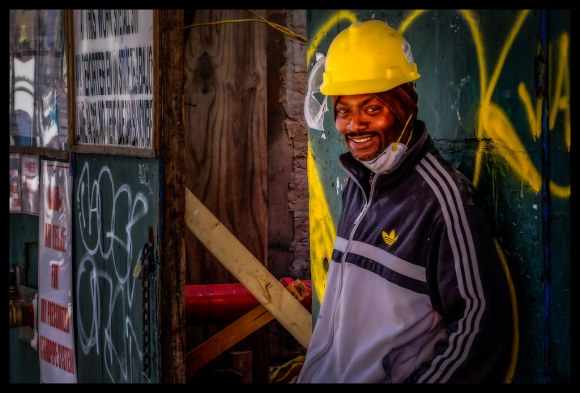
Unmasked in New York City

Unmasked - New York - 2014

When you shoot almost 2,000 images during a five day workshop, it’s amazing how many you initially overlook as you review them. This is one example – a very friendly construction worker with a great smile. For some reason, this image hadn’t caught my eye until just yesterday when I was looking back through my New York street photography images. It’s another example of capturing gesture.

Shot with my Fujifilm X-T1 and post-processed in Lightroom 5 and Photoshop CC.

Categories
Fujifilm X-T1 Lightroom New York City Nik Software Photography Photography - Fujifilm X-T1 Photoshop CC Street Photography

Prep on the Streets of New York

Prep - New York - 2014

Walking the streets of New York early in the morning reveals new perspectives. This image is an example – a worker waiting outside and checking in before heading inside to get to work. And that blue front wall in the midst of being prepped for a final coat of new paint! From my recent New York City street photography workshop with Jay Maisel.

Shot with my Fujifilm X-T1 and post-processed in Lightroom 5, Photoshop CC and Nik’s Color Efex Pro 2.

Categories
Fujifilm X-E2 Lightroom Nik Software Photography Photography - Fujifilm X-E2 Photoshop CC San Francisco/California Street Photography

Morning Glow inside San Francisco’s Ferry Building

Blue Bottle - San Francisco - 2014

This is a shot inside San Francisco’s Ferry Building on a beautiful morning. The windows up top in the building provide beautiful indirect light into the market areas. This image was shot outside the Blue Bottle Coffee shop with my Fujifilm X-E2 and post-processed in Lightroom 5, Photoshop CC and Nik’s Color Efex Pro 4.

Categories
Fujifilm X100S Lightroom Photography Photography - Fujifilm X100S Photoshop CC Stanford Street Photography

A Bit of Solitude at Stanford Memorial Church

Solitude - Stanford - 2014

I recently took a Sunday walk on the Stanford campus – something that was an almost weekly occurrence when Lily was alive. We always had a great time – she made lots of new friends and found lots of interesting smells along the way. And I got some nice exercise – which I’ve been missing!

On this Sunday morning, I had my Fujifilm X100S with me. Here’s one of the images – taken in the small area behind the Stanford Memorial Church. A great spot for peace and quiet – and for reading.

I post-processed this in Lightroom 5 and Photoshop CC – applying a bit of a painterly effect.

Categories
Filoli Fujifilm X-T1 Photography Photography - Fujifilm X-T1 Photoshop CC

In the Garden at Filoli

Wheelbarrow - Filoli - 2014

Here’s another image shot with my Fujifilm X-T1 of the central garden area at Filoli.

We were walking back to head home when I noticed the wheelbarrow in the lovely light. I processed this in Lightroom 5 with a touch of dodging and burning done in Photoshop CC.

Categories
Black and White Filoli Fujifilm X-T1 Lighthouse Monochrome Photography Photography Photography - Black & White Photography - Fujifilm X-T1 Photoshop CC VSCO Film

The Olive Grove at Filoli

In the Grove - Filoli - 2014

Another image from my Fujifilm X-T1 on a recent visit to Filoli.

The X-T1 is my new favorite camera – a joy to use and it produces some beautiful images!

Processed in Lightroom 5 and Photoshop CC – monochrome conversion using VSCO Film – and a touch of platinum toning.